#note/new
# List Metadata
While writing my notes, it helps to include writing about the notes that I want to process later without distracting my current focus.
## List items
I include metadata on list items to identify my sparks, thoughts, ideas, questions, and actions.
## My inline tags
For example, I use an inline nested tag with a common `my` prefix like `#my/idea`, `#my/spark`, `#my/thought`, `#my/question`, `my/group`, and `my/action` after any inline field time stamp `(time:: HH:mm)` and before the item text.
## Inline field data
Note that Dataview inline fields use a double colon between field name and value, whereas Obsidian file properties in YAML frontmatter use a single colon.
## Field style
Wrapping an inline field in parentheses suppresses displaying the field name (like __time)__, and only shows the time value highlighted with a gray background; if you want the field name displayed, such as glucose, insulin, carbs, activity, or weight, then wrap the field in square brackets instead to see both field name and value.
## Item groups
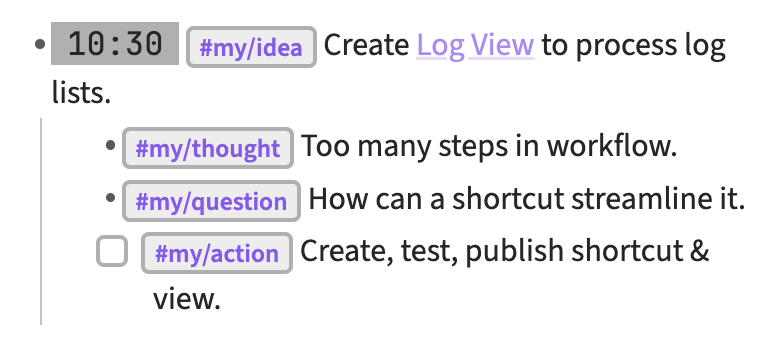
For a spark, idea, or group of related items, I just include the time stamp on the group item, and omit it from each indented item. Here's an example log:
## View queries
I use the metadata in a Log View with Dataview queries that help me process these items during my ARC Review practices for the day, week, and month.